web
You’re offline. This is a read only version of the page.
close
Skip to main content

Notifications

Announcements

Community site session details

Community site session details

Session Id :
Power Platform Community / Forums / Power Automate / Get Response Details M...
Power Automate
Unanswered

Get Response Details Missing From Field Dynamic Content

(1) ShareShare
ReportReport
Posted on by 2
I have an MS Form and SharePoint list and am creating a flow in Power Automate to create the submitted form details into the SharePoint List. I have 7 fields on my form that I need to populate into the list. For 6 of the 7 when I click on the field I am presented with dynamic content.


However, for one field only, I get just "When a new response is submitted" as the only option.


My overall flow looks like this
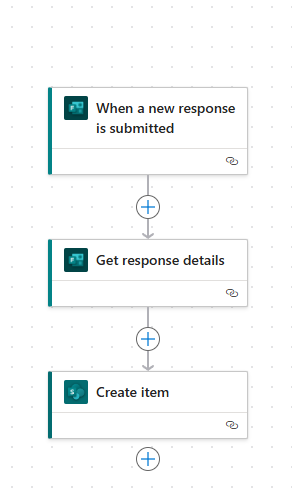
 
Why am I unable to see the "Get Response Details" for that field only? 
Categories:
I have the same question (0)
  • Suggested answer
    Michael E. Gernaey Profile Picture
    53,199 Super User 2025 Season 2 on at
    Hi
     
    Firstly, can you please share the output of the Trigger and the Get Response Details from the flow run.
     
    Next, is the field required? Did the person actually put data into it are you accidentally pointing to the wrong version of the Form?
     
    And the reason you only see that is because its a Numeric field and only ID is numeric. Which seems to me that whatever you are collecting is a string not an int and that field is an INT so its only showing you INTs aka numbers
     
  • Robertsonland Profile Picture
    2 on at
    I am just building the automation so there isn't a flow run yet. So not sure there is anything to show.
     
    The field is required but again no data has been put in yet as I'm just trying to set up the automation.
     
    The field is also a number so there definitely is a number in the form.


  • EMJP Profile Picture
    6 on at

    It looks like you're trying to match the "Days to staff" field from your form with the "staffed days" field from your SharePoint list.

    Here's the issue: the "staffed days" field in your SharePoint list expects an integer (whole number), but the "Days to staff" field is a string (text). You'll need to convert the string to an integer.

    To do this, you can use this formula:


    Make sure to replace the red value with the actual field from your form. I got this value by using the dynamic field feature, which pulls data from another field in your list.
     
    int(outputs('Get_response_details')?['body/r3f879b08ab2c41d58c03483043bf1b73'])


Under review

Thank you for your reply! To ensure a great experience for everyone, your content is awaiting approval by our Community Managers. Please check back later.

Helpful resources

Quick Links

Forum hierarchy changes are complete!

In our never-ending quest to improve we are simplifying the forum hierarchy…

Ajay Kumar Gannamaneni – Community Spotlight

We are honored to recognize Ajay Kumar Gannamaneni as our Community Spotlight for December…

Leaderboard > Power Automate

#1
Michael E. Gernaey Profile Picture

Michael E. Gernaey 525 Super User 2025 Season 2

#2
Tomac Profile Picture

Tomac 425 Moderator

#3
abm abm Profile Picture

abm abm 245 Most Valuable Professional

Last 30 days Overall leaderboard
