web
You’re offline. This is a read only version of the page.
close
Skip to main content

Announcements

News and Announcements icon
Community site session details

Community site session details

Session Id :
Power Platform Community / Forums / Power Automate / OneDrive for Business ...
Power Automate
Answered

OneDrive for Business "Get file thumbnail" returning blank URL

(1) ShareShare
ReportReport
Posted on by 8
I'm trying to create a flow to generate a PDF report for surveys containing a number of photographs which are stored in dataverse. As the images can be large & the PDF has to be less than 2Mb, I need to reduce the image sizes.
The flow currently gets the dataverse image and creates a new image file on OneDrive. The "Get file thumbnail" should then get the smaller image and return a URL which in turn is Uploaded to OneDrive. I then use the Get file content to get the base64 data & append to a HTML table before saving to a HTML file / converting to PDF.
The flow was working reasonably ok but is now failing to get the thumbnail URL.
 
 
The creation of the full-size file in OneDrive from dataverse is working and the Get file thumbnail shows that it completed successfully, but the URL is blank, and so the flow fails on the next step:
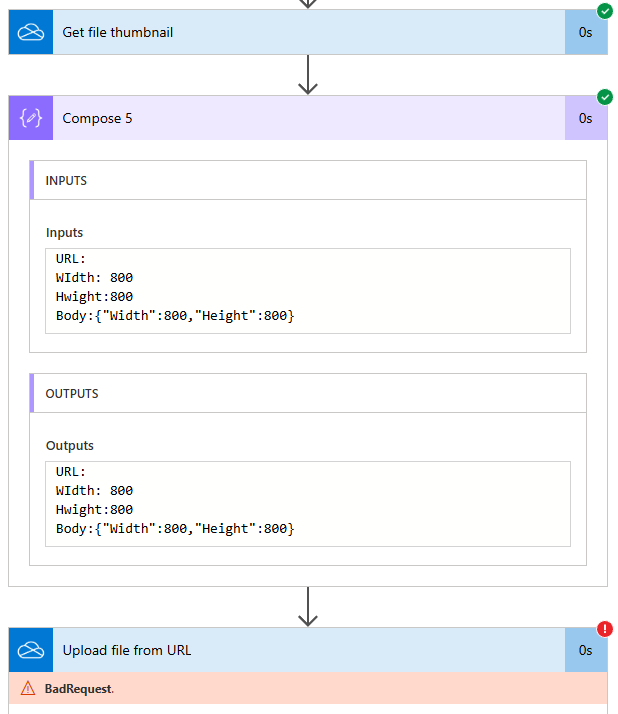
 
The "Get file thumbnail" action also fails if I manually select a file... (I've also tried a separate test flow with manually selected file & the URL returned from that is also blank)
 
Any ideas what the problem could be?
Many thanks
Ivor
 
Categories:
I have the same question (0)
  • Suggested answer
    Haque Profile Picture
    3,653 on at
    Hi @CU23061420-0,
     
     
    Is this happening intermittently or just always?
     
     
    The symptom indicates that the thumbnail either hasn't been generated yet or is not available for that file type or location. To be more specific, seems like file creation has been completed (as you mentioned), OneDrive may take some times to generate thumbnail when it takes it from Dataverse. Also, if the flow immediately calls "Get file thumbnail" after creating the file probably it's not ready yet, that may result a blank URL.
     
    To give a  quick check - after "Create file" in OneDrive, could please add a Delay action for 15-20 seconds?
     
    Also - once delay is completed, call "Get file thumbnail" with file identifier - I would suggest to have a check here if the file exisits. If the thumbnail URL is still blank, retry the "Get file thumbnail" action up to 3 times with incremental delays.
     

    I am sure some clues I tried to give. If these clues help to resolve the issue brought you by here, please don't forget to check the box Does this answer your question? At the same time, I am pretty sure you have liked the response!
     
  • CU23061420-0 Profile Picture
    8 on at
    Thanks Haque,
    The problem started happening today, and occurs each time I try to run a flow. The problem also occurs in a test flow with a file that already exists, rather than one which is dynamically created:
     
    Good to know about the Delay action, but as the problem occurs with an existing file, and the flow was working last week, I don' think this is an issue. (With a 30 sec delay included the problem still occurs).
    Thanks
    Ivor
  • Suggested answer
    Haque Profile Picture
    3,653 on at
    Hi @CU23061420-0,
     
    Ah! That's  bad news. Something weired happening. Now we need to narrow down with trial and erorr. I search in hte Known issues dashbaord with different filter criteria for powerautomat - found nothing realated this issue.


    Can you please do one thing: please check file type and thumbnail support. Let's verify that the file type you created is supported for thumbnail generation by OneDrive. Also, let's make sure we have the coorect file identifier/path - you pass to "Get file thumbnail" exactly matches the file created. Note alwasy, but sometimes, if the file is moved, renamed, or the identifier is incorrect, the thumbnail action returns no URL.
     
    Finally - do a refresh of the flow connections - remove the connections and connect again.
     
  • CU23061420-0 Profile Picture
    8 on at
    Thanks again Hague,
    The file type is jpeg (I've also tried a png file). On the test flow, I've tried with older images as well as ones created by the flow. Output from "Get File Metadata" all looks good, and the full-size images open ok in other programs & their thumbnails are displayed ok in Windows Explorer.
    Unfortunately the processes I ran on Friday have all expired, so I can't check if the problem lies elsewhere.
    I have tried refreshing the connection, but can't remove them from the Solution without deleting all the OneDrive for Business references. I have tried creating a test flow within a different Solution, and that also shows the same problem (using Get file Metada to retrieve the file id).
    I think I'll wait until tomorrow & see of the problem still occurs...
    Many thanks
    Ivor
  • FC-30060456-0 Profile Picture
    2 on at
    I've also just noticed this is happening aswell, has broken an important flow of mine. Absolutely nothing changed in the flow config, perms or anything. Has worked fine for ages, and then all of a sudden stops. Strongly feel it is a Microsoft failure here as everything else has remained constant for us.
  • Ellis Karim Profile Picture
    12,163 Super User 2026 Season 1 on at
    I'm also seeing an error in a test flow I wrote back in November 2025. The Get file thumbnail action does not contain the Url property anymore:
     
     
    Ellis Karim
    Ellis Karim
    elliskarim.com  |  LinkedIn  |  Bluesky
    If this solved your issue, please mark it as ✅ Accepted Answer. If it helped, feel free to give it a 🩷 Like!
  • Verified answer
    Ellis Karim Profile Picture
    12,163 Super User 2026 Season 1 on at
     
    You may be able to use this alternative method to get the file previews using a SharePoint "trick" (OneDrive is based on SharePoint):


    The webURL referenced above is the URL to your OneDrive Documents folder. It looks something like this:
     
    But we can get this dynamically, so we don't need to hard code it:
     
    Office 365 Users: Send an HTTP Request:
    
    Uri: https://graph.microsoft.com/v1.0/me/drive?select=webUrl
    Method GET
    Content-Type: application/json
    
    
    WebUrl:
    
    body('Send_an_HTTP_request')?['webUrl']
     
     
    Send an HTTP request to SharePoint (Get File Preview)
    Site Address: Any SharePoint site you have access to 
    Method: GET
    Uri (copy and paste the Uri):
    /_layouts/15/getpreview.ashx?path=@{variables('webUrl')}@{outputs('Create_file')?['body/Path']}
    
    
    Ellis Karim
    Ellis Karim
    elliskarim.com  |  LinkedIn  |  Bluesky
    If this solved your issue, please mark it as ✅ Accepted Answer. If it helped, feel free to give it a 🩷 Like!
  • CU23061420-0 Profile Picture
    8 on at
    Thanks Ellis Karim, that worked!
    I added a "resolution" parameter to the Sharepoint preview as per: https://vitalyzhukov.com/en/sharepoint-online-document-thumbnail
    Many thanks
    Ivor
  • jakeroxs13 Profile Picture
    2 on at
    I appreciate the workaround, but this action clearly changed behavior yesterday, it was functional for over a year prior to yesterday.

    Edit: After attempting the workaround, the get preview api request does not return a URL either, it just gives the base64 value, which is useless for my case unfortunately as I need a URL specifically for a teams post flow.
  • AndersonJSilva Profile Picture
    4 on at
    Hi everyone,

    I am having the same issue with the OneDrive for Business action "Get file thumbnail" in Power Automate.

    The action runs successfully with status code 200, but the response body no longer includes the "Url" property. It only returns "Width" and "Height".

    This used to work before, and my flow depends on the thumbnail URL to send it back to a Power Apps app. Nothing was changed in the flow, but now the URL is missing from the output.

    Example of the current response:

    {
    "body": {
    "Width": 800,
    "Height": 800
    }
    }

    So it looks like this is not an expression issue in the flow. The "Url" property is simply not being returned by the connector anymore.

    Is anyone aware of an official fix or workaround for this issue?

    Thanks.

Under review

Thank you for your reply! To ensure a great experience for everyone, your content is awaiting approval by our Community Managers. Please check back later.

Helpful resources

Quick Links

Season of Sharing Community Challenge Launch!

Jump in, show your community spirit, and win prizes!

Kudos to our 2025 Community Spotlight Honorees

Expanding mentorship, skilling, and AI innovation

Congratulations to the May Top 10 Community Leaders!

These are the community rock stars!

Leaderboard > Power Automate

#1
Valantis Profile Picture

Valantis 377

#2
11manish Profile Picture

11manish 279

#3
David_MA Profile Picture

David_MA 234 Super User 2026 Season 1

Last 30 days Overall leaderboard
