Building business applications in Power Apps Canvas Apps often involves displaying and managing large amounts of data. Traditionally, developers have relied on classic controls such as Gallery, Data Table, Forms, and Buttons to build these experiences.
While these controls are fully functional, creating a modern and responsive user interface often requires significant customization. Developers frequently spend additional time configuring layouts, aligning controls, writing formulas, and applying custom styling to achieve a polished user experience.
To simplify app development, Microsoft introduced Modern Controls, which provide a Fluent UI experience with improved accessibility, responsive layouts, and a consistent design language across applications.
One of the most valuable additions is the Modern Data Grid, which makes displaying business data easier while significantly reducing development effort.
Why Choose the Modern Data Grid?
The Modern Data Grid offers several advantages over traditional approaches:
- Fluent UI design that matches Microsoft 365 applications
- Responsive layout with minimal configuration
- Multi-row selection
- Automatic row selectors
- Built-in sorting
- Built-in search
- Column sorting and resizing
- Better accessibility
- Cleaner and more maintainable apps
- Less custom Power Fx
Prerequisites
Before getting started, make sure Modern Controls are enabled in your Canvas App.
Navigate to:
Settings → Updates → Enable Modern controls and themes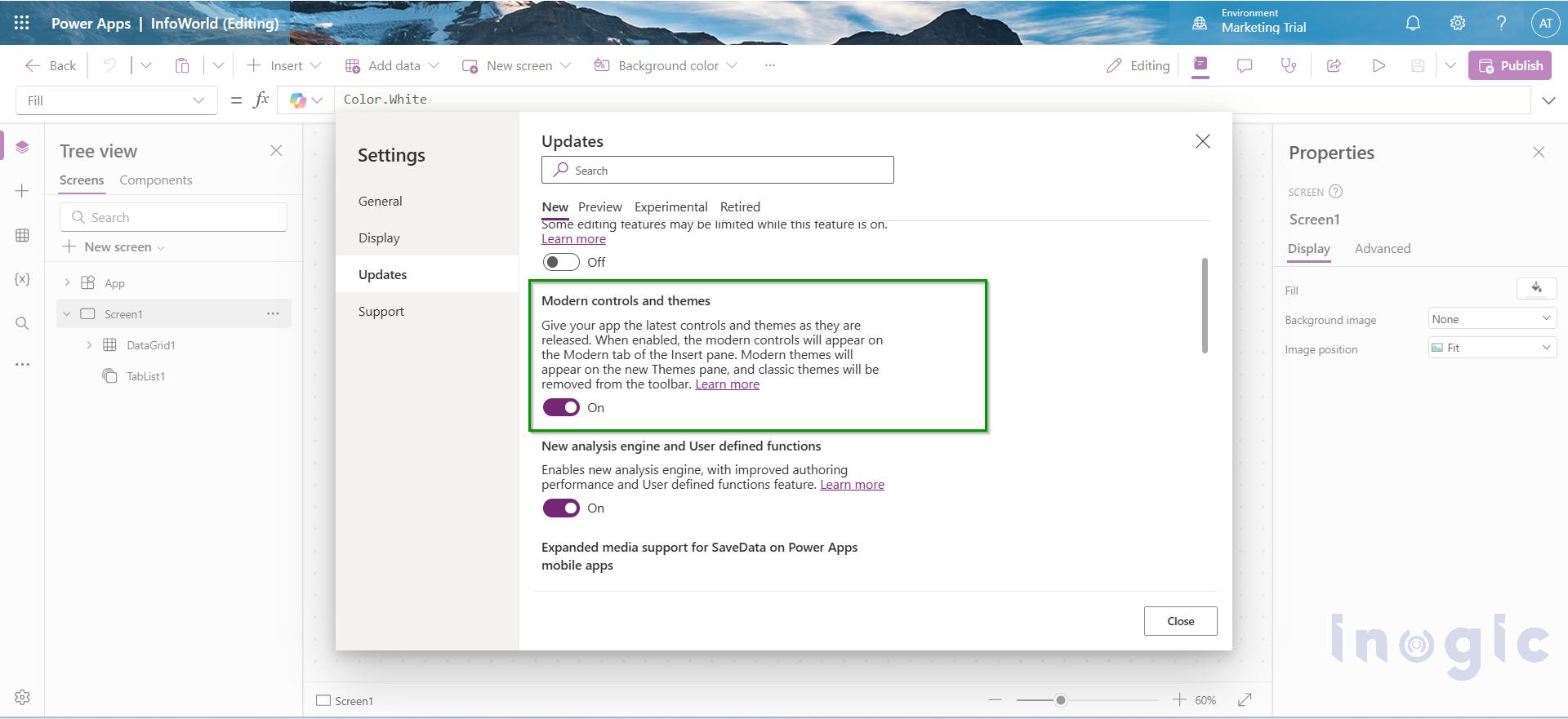
Real-World Scenario
Let’s build a simple Account Management Canvas App.
The app displays a list of customer accounts with the following information:
- Account Name
- Account Number
- Main Phone
- City
- Status
We’ll first build the application using classic controls and then modernize it using Modern Controls... Read More


