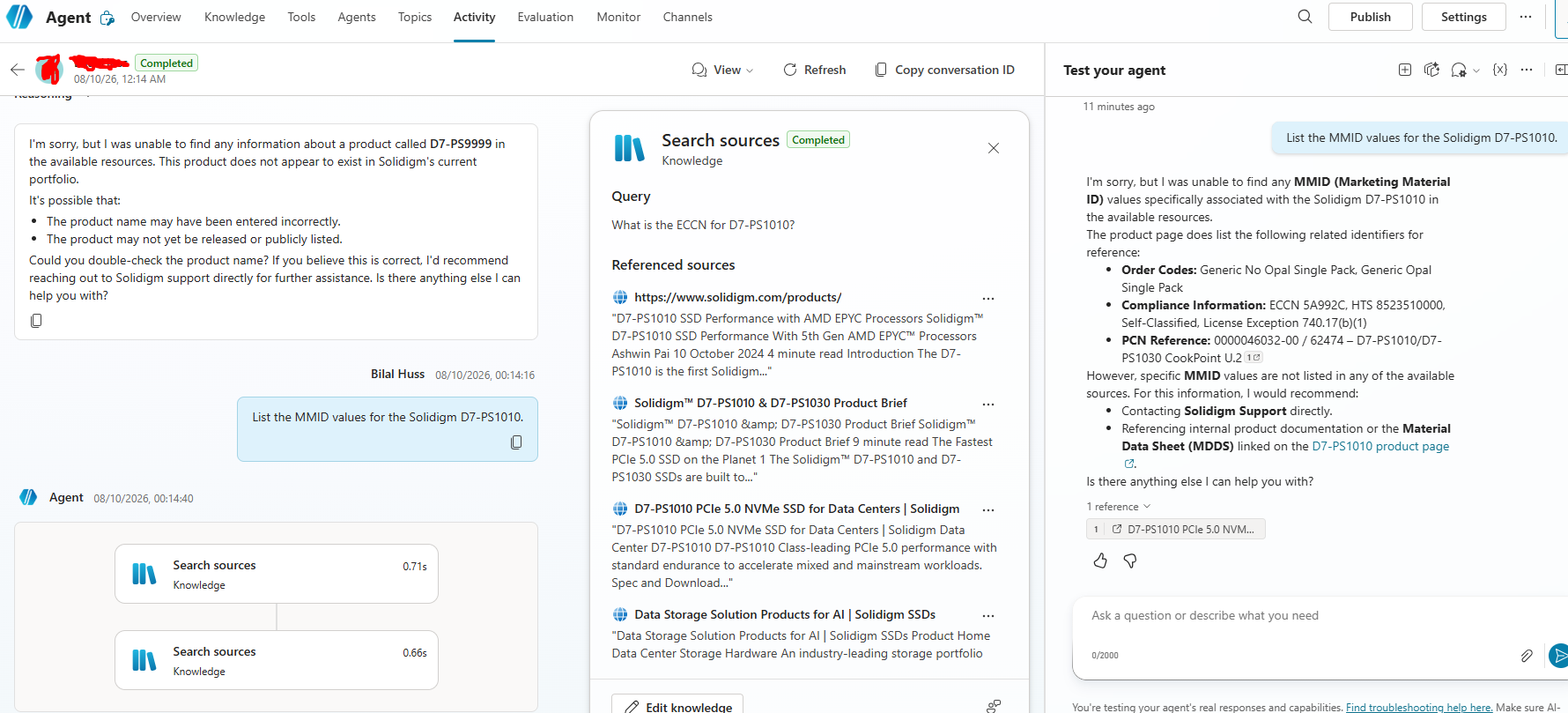
I tested your premise directly (Screenshots at the end) that a Website knowledge source only reads rendered/visible text and skips <meta> content — and it turns out meta-tag data can surface. Details below.
Setup note first: you can't add the deep page URL directly — Copilot Studio rejects it with "The website can't end with a file extension" if the URL ends in .html. [screenshot of the error] So I added the parent instead: https://www.solidigm.com/products/. The Public Website source grounds across publicly viewable content under that path, including child pages like the ps1010 page.
Test 1 — hallucination control. I asked for the ECCN of a fake model, D7-PS9999. The agent didn't invent anything — it said the product doesn't appear to exist. So it genuinely grounds rather than fabricating. [screenshot]
Test 2 — meta-only values. Asking about the D7-PS1010, the agent returned identifiers that only exist in the raw <meta> tags, not in the visible page (the Compliance table populates via JS and doesn't show these): [screenshot]
- Compliance: ECCN 5A992C, HTS 8523510000, Self-Classified, License Exception 740.17(b)(1) (from
solidigm:eccn / solidigm:usHts / solidigm:ccats)
- PCN Reference: 0000046032-00 / 62474 – D7-PS1010/D7-PS1030 CookPoint U.2 (from
solidigm:pcn)
Those aren't visible body text — so the source did index and retrieve meta content.
Why it works: the Public Website source grounds on Bing's index rather than crawling raw HTML itself, and Bing crawls meta tags. So whether a field surfaces depends on what Bing indexed for that page. That's also a likely reason your original attempt failed — the page or that specific field may not have been in Bing's index yet.
Important caveat: it's not reliable field-to-field (a specific MMID field didn't come through for me; ECCN/HTS/PCN did), and it's entirely dependent on Bing's crawl. So for compliance-critical values I wouldn't rely on the Website knowledge source in production.
Reliable approach: read the source deterministically instead — a Power Automate flow (or custom connector) that does an HTTP GET on the page, parses the specific <meta name="solidigm:eccn"> value from the raw HTML, and returns just that string. Add the flow as a tool and instruct the agent to call it for these lookups. That bypasses Bing and reads the tag directly every time.
Hope this helps !