web
You’re offline. This is a read only version of the page.
close
Skip to main content

Announcements

News and Announcements icon
Community site session details

Community site session details

Session Id :
Power Platform Community / Forums / Power Apps / Power automate flow tr...
Power Apps
Suggested Answer

Power automate flow trigger for power apps

(0) ShareShare
ReportReport
Posted on by 4
 Trying to create a flow that triggers from a button press, but when using the (ClickabuttoninPowerAppstosendanemail_1.Run) function the Sendanemail(v2) is not recognized and gives an error?
Categories:
I have the same question (0)
  • WarrenBelz Profile Picture
    155,838 Most Valuable Professional on at
    I assume you have sent a Date and three text fileds in the Flow parameters ? I am a bit confused about the parameters in the email - they should be the three text fields in the trigger above - @triggerBody()['text'], @triggerBody()['text_1'] and @triggerBody()['text_2']
    - how do you arrive a the formulas I can see in the email fields ?
     
    Please ✅ Does this answer your question if my post helped you solve your issue. This will help others find it more readily. It also closes the item. If the content was useful in other ways, please consider answering Yes to Was this reply helpful? or give it a Like ♥
    Visit my blog
    Practical Power Apps    LinkedIn  
     
  • Suggested answer
    CU05061344-0 Profile Picture
    2 on at
    @CU08060810-0 Could you please elaborate more on the parameter you're passing in the Send Email Action? Those property in To, Subject and Body don't look like the parameter you're passing to the flow trigger.
  • Suggested answer
    DP_Prabh Profile Picture
    381 on at
    Hi @CU08060810-0, I have created a test flow to explain it to you by giving more context:
    Here is the flow, which looks similar to your flow:
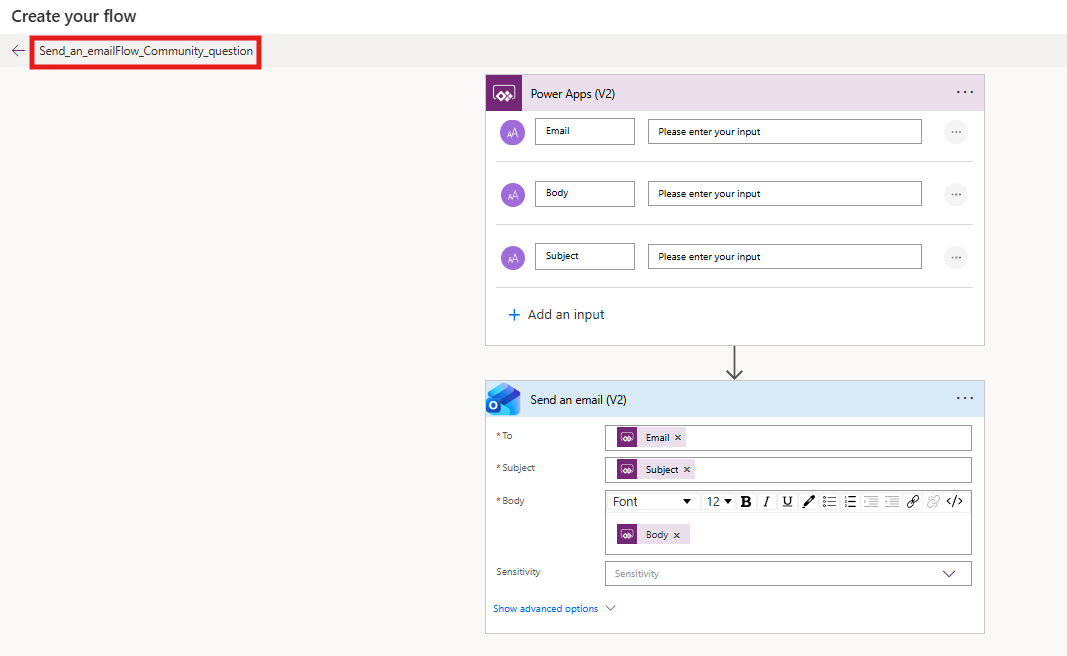
    In Power Apps, when you write the code to trigger the flow, it will ask for the parameters as seen below:
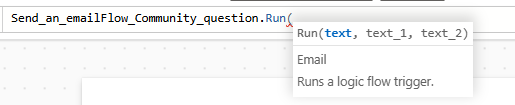
    So, we don't know which mapping is to be provided, as in the Power Automate flow, I have clearly mentioned email, subject and body, but in Canvas it asks me to provide text, text_1, text_2.


    What I do is go to the flow and hover on the Power Apps (V2) action variables, and you'll see their logical names. See below:
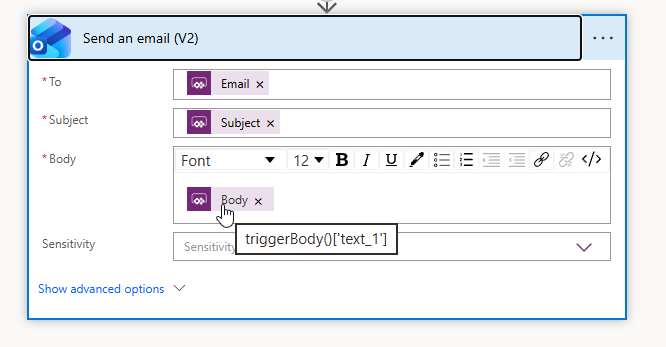
    Based on it in the Canvas App, do the mapping like in my case, I'll do like 

    1) Email - (logical name: text)

        Value= senderemail@gmail.com

    2) Subject- (logical name: text_2)

         Value= Test Email

    3) Body- (logical name: text_1)

         Value: This is a testing email. How to trigger a flow from Power Apps.

    So, my formula for trigger flow from Power Apps will be like this. 

     

    Then click on the button and run the flow. The flow will send an email notification to the sender email you have provided. 


    I hope that works for you!

    If you have any further questions, let me know!


    Reference: Create a canvas app that can trigger a Power Automate flow - Power Apps | Microsoft Learn

    Official Microsoft Power Automate documentation - Power Automate | Microsoft Learn


    If this was helpful, please mark it as the Verified Answer (✓). Thank you!

Under review

Thank you for your reply! To ensure a great experience for everyone, your content is awaiting approval by our Community Managers. Please check back later.

Helpful resources

Quick Links

Season of Sharing Community Challenge Launch!

Jump in, show your community spirit, and win prizes!

Kudos to our 2025 Community Spotlight Honorees

Expanding mentorship, skilling, and AI innovation

Congratulations to the May Top 10 Community Leaders!

These are the community rock stars!

Leaderboard > Power Apps

#1
Valantis Profile Picture

Valantis 424

#2
WarrenBelz Profile Picture

WarrenBelz 355 Most Valuable Professional

#3
11manish Profile Picture

11manish 290

Last 30 days Overall leaderboard
