web
You’re offline. This is a read only version of the page.
close
Skip to main content

Announcements

News and Announcements icon
Community site session details

Community site session details

Session Id :
Power Platform Community / Forums / Power Pages / Content on live site n...
Power Pages
Suggested Answer

Content on live site not updating after header page title is changed

(2) ShareShare
ReportReport
Posted on by 4
1. Edit header title in power pages edit:
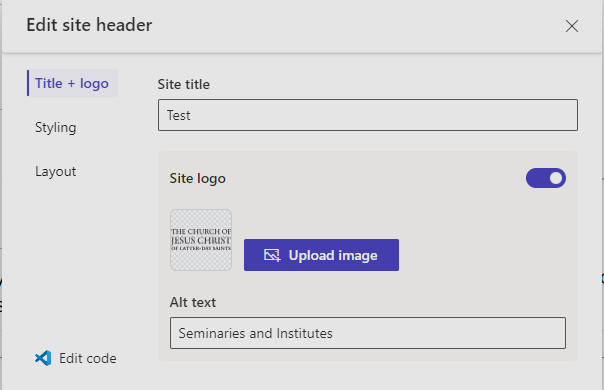
I should note that I've also tried having both the Site Title and Alt Text "Test" and blank, but the live site does not change
 
2. Hit Sync
3. Open up live site
4. Site does not reflect changes:
 
This is the Edit window:

 
This is the live site:

 
How can I change this content to show something other than what's on the live site, or nothing at all?
Categories:
I have the same question (0)
  • Suggested answer
    sannavajjala87 Profile Picture
    728 Super User 2026 Season 1 on at
    Hi,
     
    It sounds like the header text is being sourced from somewhere other than the Site Title field in the Header editor. In Power Pages, the text displayed beside the logo is often controlled by the website's branding settings, a web template, or custom header code rather than the Site Title setting itself.
    A few things to check:
    • Try clearing your browser cache or opening the site in an InPrivate/Incognito window after syncing.
    • Verify whether the header was customized using Edit code. If a custom web template, content snippet, or Liquid code is being used, it can override the value entered in the Header editor.
    • Check for any content snippets or site settings related to the header, branding, or logo text. Custom themes sometimes pull this value from a snippet instead of the Site Title field.
    • If you want to display only the logo, try disabling the Site Title display in the header layout settings or reviewing the header template to see whether the text is hardcoded.
    • If this is a template-based site, inspect the header web template and look for references to the current text ("Seminaries and Institutes"), as it may be stored directly in the template.
    Given that your changes sync successfully but the live site continues to show the original text, my suspicion is that the header has been customized and is not currently using the Site Title value from the design studio. Checking the header template or content snippets would be the next place I'd investigate.

    Thanks,
    Manoj Annavajjala
  • Suggested answer
    Fubar Profile Picture
    8,526 Super User 2026 Season 1 on at
    Not sure it is this but it may be the header output cache (when its enabled, for performance, the user is served an already rendered header/footer), there is a site setting to turn it on/off
     
     
    Also, have you tried clearing/purging the portal cache,  if logged into the Site as user with the Administrators web role assigned <siteurl>/_services/about   or find the site in the Admin Centre (https://admin.powerplatform.microsoft.com/) and purge cache (from the 3 dots next to site name)

Under review

Thank you for your reply! To ensure a great experience for everyone, your content is awaiting approval by our Community Managers. Please check back later.

Helpful resources

Quick Links

Season of Sharing Community Challenge Winners!

Congratulations to our community stars!

Kudos to our 2025 Community Spotlight Honorees

Expanding mentorship, skilling, and AI innovation

Congratulations to the June Top 10 Community Leaders!

These are the community rock stars!

Leaderboard > Power Pages

#1
sannavajjala87 Profile Picture

sannavajjala87 38 Super User 2026 Season 1

#2
Valantis Profile Picture

Valantis 37

#3
11manish Profile Picture

11manish 22

Last 30 days Overall leaderboard
